05 — In the project
Explorer and files
Browse the project, create and delete files, and understand the tree and its exclusions.
On this page
Browse the tree
Lists root children, sorting folders before files. ↑/↓ selects; Enter or click opens a file or toggles a folder. .git is always hidden. Ignored entries remain visible in gray.
Left only collapses an expanded folder. Shift+Enter collapses descendants if open or recursively expands subdirectories if closed (except .git); Ctrl+Shift+Enter collapses everything. There is no Right-to-expand or Left-to-parent action.
Virtualization renders visible rows and a margin, rather than the whole tree at once. Long names scroll when a row is selected. F5 preserves the selection index, so ordering changes may select another path.
Create a file
- Select the destination folder, or a file whose parent is the destination.
- Press Ctrl+N, type a name and confirm with Enter. Esc cancels.
- OEC creates exclusively, refreshes the tree and opens a tab. If the name exists, it reports an error without replacing it.
Rename files and folders
With Explorer focused, select an entry and press F2; the palette also offers Rename when an entry is selected. The dialog starts with the current name: Enter confirms and Esc cancels. It cannot rename the root and rejects empty names, . or .., slashes and existing targets. Errors keep the dialog open.
After renaming it preserves affected file/image tab content and state while updating their paths, including descendants of a renamed folder; it moves expansions, refreshes the tree and invalidates the index. Links are renamed as links. Git can observe the disk rename.
Delete an entry
Delete opens a confirmation; Enter deletes and Esc cancels. Folders are recursively deleted without a recycle bin. Affected modified tabs are checked before execution and block deletion.
On success, affected tabs are closed and the index is invalidated. The root cannot be deleted. A link is removed as a link without recursively deleting its external target.
Count lines and rank large files
From Ctrl+P, Count project lines reads disk text; it skips binary, unreadable and over-2-MiB files. Empty files count as zero; a trailing newline adds no extra line. Counts do not refresh automatically on save.
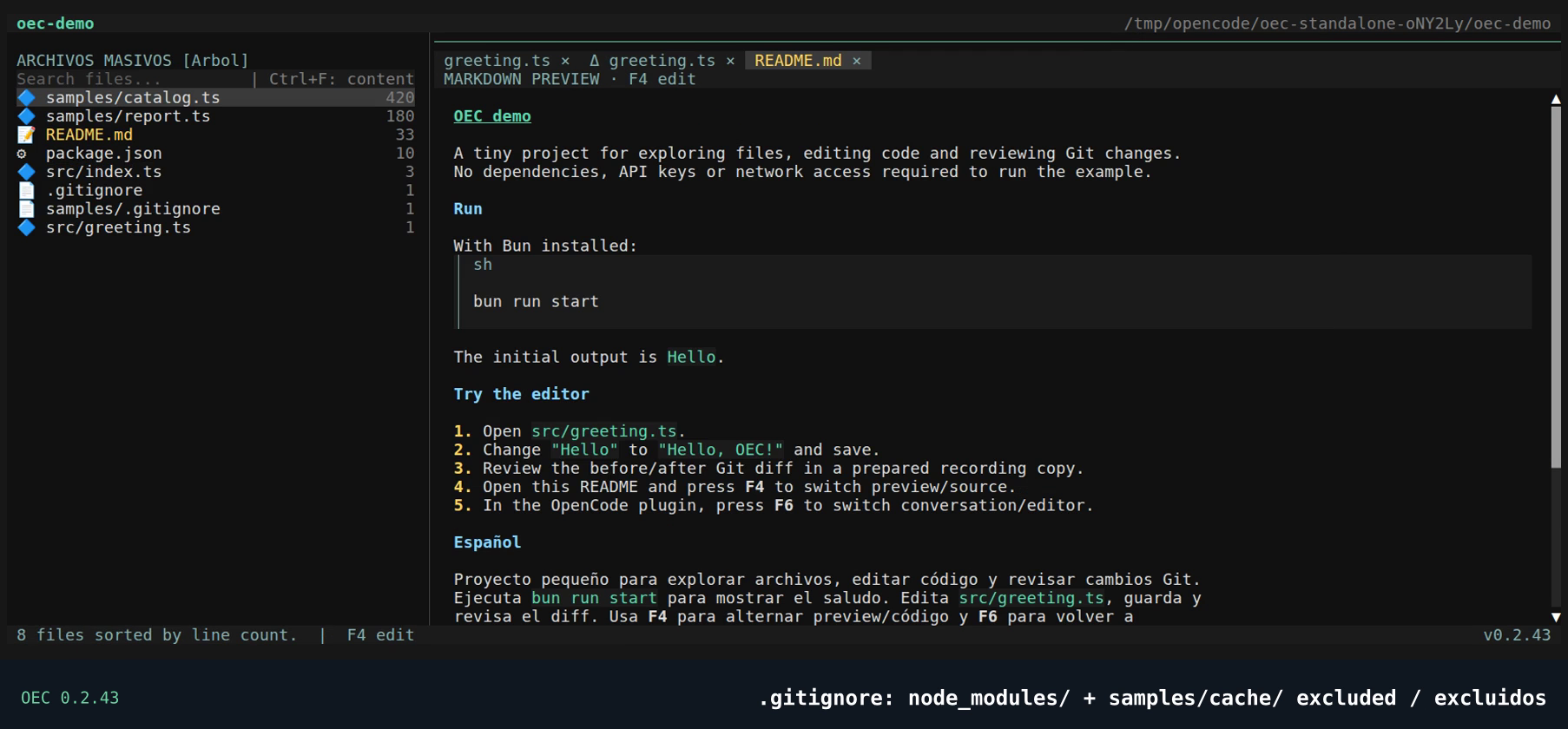
Show massive files in the palette, or [Masivos] in the header, ranks text files by descending line count, with ties by path. It follows root and nested .gitignore files even if search.respectGitignore is false; temporary exclusions do not apply. It excludes .git and prunes ignored directories before traversal. The index may be partial at 50,000 entries. [Árbol] returns to the normal tree.
The demo shows example files with 420 and 180 lines and verifies that node_modules and samples/cache, ignored by root and nested rules respectively, do not appear. This ranks lines, not complexity or byte size.
Chapter sources
Links pinned to the reviewed commit; they do not follow main.